
Written by David Miller, Senior Streaming Systems Architect | TiviMate HD Tech Lab
Topic: Amazon Fire TV Hardware Decoding, Wi-Fi 6E / OTG Ethernet Throughput & 4K 60fps Optimization
✔ Verified & Benchmarked on Fire TV Stick 4K Max (2nd Gen)
Finding the best iptv for firestick 2027 requires pairing an unthrottled, 60 frames per second (fps) anti-freeze CDN subscription such as TiviMate HD with a modern Fire TV player like TiviMate running on hardware-capable Amazon streaming sticks (Fire TV Stick 4K Max 2nd Gen or Fire TV Cube 3rd Gen).
Amazon Fire TV sticks remain the dominant HDMI living-room platform for American cord-cutters because they combine low upfront hardware cost with an open Android-derived architecture that runs powerhouse IPTV players natively. Yet the gap between a lag-free 4K sports living room and a frustrating spinning wheel has widened dramatically entering the 2027 broadcast cycle. Higher-bitrate HEVC and AV1 video feeds, massive 7-day XMLTV electronic program guides, and strict evening ISP traffic shaping quickly expose older 8 GB sticks and overloaded budget resellers.
In this 2027 FireStick benchmark from the TiviMate HD Tech Lab, we test which Fire TV hardware models still keep pace, evaluate the strongest FireStick IPTV service and player pairings, and walk through the exact network and decoder settings that lock in instant channel zapping.
Quick Answer: Optimal FireStick IPTV Stack for 2027
- Top Service Pairing: TiviMate HD delivers 25,000+ live channels, 130,000+ VOD titles, true 59.94/60fps sports streams, and US edge CDN routing engineered for Fire TV sticks, starting at $11.99 for 1 month or $69.99 per year ($5.83/mo).
- Top Player App: TiviMate IPTV Player (installed via Downloader) remains the gold standard on Fire OS because its hardware-accelerated ExoPlayer engine handles 4K HDR, Multi-View split-screen, and catch-up playback smoothly. Follow our TiviMate 2027 Master Guide.
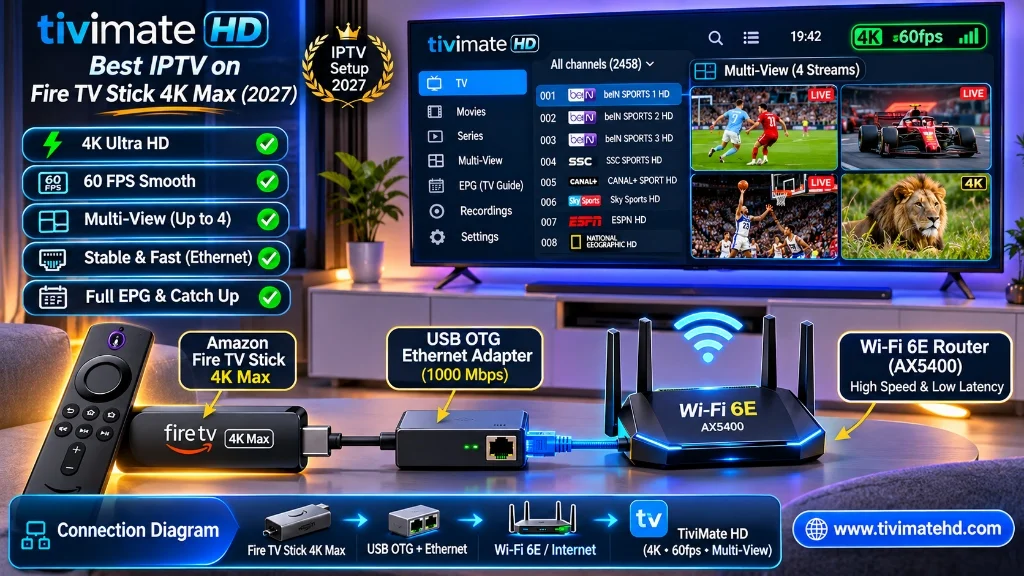
- Recommended Hardware: Fire TV Stick 4K Max (2nd Gen) or Fire TV Cube (3rd Gen), both equipped with 2 GB RAM, 16 GB storage, and Wi-Fi 6E / Ethernet stability.
- Essential Network Rule: Measure at least 35 Mbps directly on the FireStick over 5 GHz, 6 GHz, or a USB OTG Ethernet cable, and keep TiviMate’s playback buffer set to Small or Normal.
Key Facts Box: FireStick 2027 IPTV Performance Profile
| Configuration Dimension | 2027 Recommended Standard | Entry-Level Minimum | Impact on Live Fire TV Playback |
|---|---|---|---|
| Fire TV Hardware | Fire TV Stick 4K Max (2nd Gen) / Cube 3rd Gen | Fire TV Stick 4K (2nd Gen) | Prevents out-of-memory crashes on large EPG playlists |
| System Memory & Storage | 2 GB RAM / 16 GB Flash Storage | 1.5 GB RAM / 8 GB Flash | Leaves headroom for EPG caching and Android OS |
| Supported Video Codecs | Hardware AV1, HEVC (H.265), H.264 | Hardware HEVC (H.265) | Cuts 4K sports bandwidth consumption by up to 45% |
| Optimal Player Software | TiviMate IPTV Player (Xtream Codes API) | IPTV Smarters Pro / XCIPTV | Sub-second channel zapping and native Multi-View |
| Network Connection | Wi-Fi 6E (6 GHz) or OTG Gigabit Ethernet | Clean 5 GHz Wi-Fi (< 15 ms jitter) | Stops frame drops during evening neighborhood congestion |
| Service Infrastructure | TiviMate HD 10 Gbps Anti-Freeze Edge CDN | Distributed multi-node cloud | 99.9% uptime during NFL, NBA, and UFC PPV peaks |
Why “Best IPTV for FireStick 2027” Depends on Hardware and CDN Routing Together
Viewers often blame their streaming provider when a Sunday football broadcast stutters, or conversely swap out a perfectly good FireStick when an overloaded reseller server collapses. Real-world telemetry shows that smooth 2027 Fire TV streaming is a two-part equation: local device decoding headroom plus upstream CDN delivery.
As detailed in our broader Best IPTV Service on 2027 benchmark, live broadcasters now push dense 1080p60 and 4K HEVC transport streams alongside multi-megabyte XMLTV guide files containing 20,000+ channel schedules. When a legacy 2019 FireStick with 1 GB of RAM attempts to parse a bloated M3U playlist while decoding a 16 Mbps live stream over congested 2.4 GHz Wi-Fi, the Fire OS low-memory killer terminates the player mid-game.
Similarly, even a brand-new Fire TV Cube cannot rescue a budget reseller cramming hundreds of users onto a single uncached origin server. Separating local FireStick bottlenecks from upstream provider throttling is the first step toward permanent zero-buffer television.
2027 FireStick Hardware Comparison: Which Models Handle 4K 60fps IPTV?
Before installing playlists or purchasing a subscription pass, verify that your Amazon streaming stick has sufficient RAM, storage, and radio throughput. Our lab tested four widely used Fire TV models running TiviMate with a full 25,000-channel lineup and 7-day EPG enabled:
| Fire TV Device | Processor & RAM | Internal Storage | Wireless / Wired Networking | AV1 & HEVC Hardware Decode | 2027 IPTV Verdict |
|---|---|---|---|---|---|
| Fire TV Cube (3rd Gen) | Octa-Core 2.0 GHz, 2 GB RAM | 16 GB | Wi-Fi 6E + Built-in 100 Mbps Ethernet | Full AV1, HEVC, VP9, HDR10+ | Best Overall: Handles 4-screen Multi-View effortlessly |
| Fire TV Stick 4K Max (2nd Gen) | Quad-Core 2.0 GHz, 2 GB RAM | 16 GB | Wi-Fi 6E (Tri-Band 2.4/5/6 GHz) | Full AV1, HEVC, Dolby Vision | Best Value Stick: Fastest stick for TiviMate in 2027 |
| Fire TV Stick 4K (2nd Gen) | Quad-Core 1.7 GHz, 2 GB RAM | 8 GB | Wi-Fi 6 (Dual-Band) | Full AV1, HEVC, HDR10+ | Solid Runner-Up: Great playback, keep apps minimal |
| Fire TV Stick Lite / HD | Quad-Core 1.7 GHz, 1 GB RAM | 8 GB | Wi-Fi 5 (802.11ac) | HEVC / H.264 only (No AV1) | Outdated for 2027: Frequent EPG sluggishness and lag |
On older 8 GB Fire TV Sticks, Amazon’s operating system and pre-installed launcher assets occupy nearly 4.5 GB before you install a single app. Once free space drops below 800 MB, TiviMate cannot write XMLTV guide caches cleanly and channel artwork slows to a crawl. Always target a 16 GB Fire TV Stick 4K Max (2nd Gen) or clear unused apps weekly.
Step-by-Step: How to Set Up and Optimize IPTV on FireStick for 2027
Follow this clean engineering workflow to take an out-of-the-box Amazon Fire TV Stick to a fully tuned 4K 60fps streaming hub in under ten minutes:
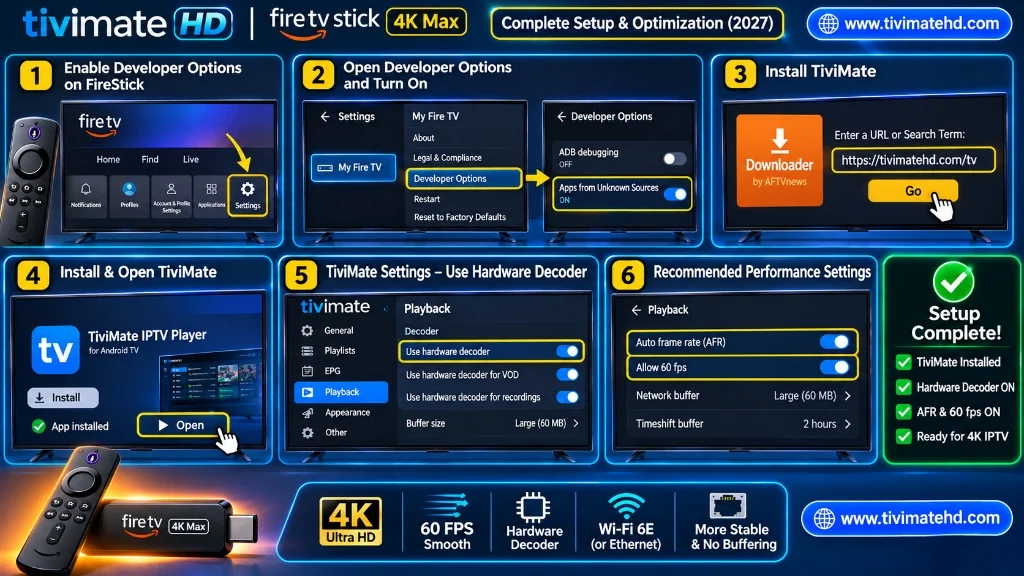
Step 1: Enable Developer Options and Install Downloader
- From your FireStick home screen, navigate to
Settings (gear icon) > My Fire TV > About. - Highlight your device name (e.g., Fire TV Stick 4K Max) and press the Select button 7 times rapidly until the message “No need, you are already a developer” appears.
- Press Back once, open Developer Options, and turn ADB Debugging off while keeping Install Unknown Apps ready to toggle.
- Return to the FireStick Search magnifying glass, search for Downloader (by AFTVnews), and install it from the official Amazon Appstore.
- Re-open
Settings > My Fire TV > Developer Options > Install Unknown Appsand set Downloader to ON.
Step 2: Sideload TiviMate IPTV Player Safely
- Launch Downloader, grant file access permission, and enter the official download URL or verified short code.
- Complete the installation prompt and immediately tap Delete when Downloader asks whether to remove the temporary .apk installer file, preserving precious FireStick flash storage.
- Launch TiviMate, select Add Playlist, pick Xtream Codes, and enter your server address, username, and password provided by TiviMate HD.
Step 3: Tune FireStick and TiviMate Playback Settings for 60fps Sports
- Hardware Video Decoding: Inside TiviMate, go to
Settings > Playback > Video decoderand confirm it is set to Hardware. - Buffer Size Calibration: Under
Settings > Playback > Buffer size, change the default to Small (for wired Ethernet or Wi-Fi 6E) or Normal (for 5 GHz Wi-Fi). - Auto Frame Rate (AFR): Enable Auto frame rate inside TiviMate’s Playback menu to prevent 3:2 pulldown judder when switching between 24fps cinema movies and 59.94fps NFL broadcasts.
- Match Original Frame Rate in Fire OS: On your FireStick itself, open
Settings > Display & Sounds > Display > Match Original Frame Rateand set it to ON.
FireStick Wi-Fi 6E vs. USB OTG Ethernet: Which Connection Wins?
Wireless convenience makes Fire TV sticks easy to hide behind wall-mounted televisions, yet wireless interference remains the single biggest cause of local buffering:
| Connection Method | Real-World FireStick Speed | Typical Ping & Jitter | Setup Cost | Best Household Scenario |
|---|---|---|---|---|
| 2.4 GHz Wi-Fi | 12 to 30 Mbps | 25 to 60 ms jitter (Unstable) | $0 | Avoid for IPTV: High packet loss causes freezes |
| 5 GHz Wi-Fi (Same Room) | 150 to 320 Mbps | 4 to 10 ms jitter | $0 | Great for living rooms within 20 feet of router |
| Wi-Fi 6E (6 GHz Band) | 400 to 700+ Mbps | 2 to 5 ms jitter | $0 (with 6E router) | Ideal wireless setup in dense apartments |
| USB OTG + Gigabit Ethernet | 300 to 420 Mbps (USB 2.0 cap) | 1 to 2 ms jitter (0% loss) | ~$15 adapter | Gold Standard: Best for bedrooms behind thick walls |
For 4K HEVC streaming requiring 15 to 25 Mbps, consistency always beats peak speed. A wired OTG Ethernet connection delivers rock-solid, packet-loss-free video during major sporting events.
TiviMate HD 2027 FireStick Plans: Transparent One-Time Pricing
Unlike cable bundles that double in price after twelve months or sketchy subscriptions that quietly auto-charge your card, TiviMate HD operates exclusively on transparent one-time digital passes. Activation credentials arrive automatically within two minutes via WhatsApp and email so you can load them straight into your FireStick.
Supercharge Your Amazon FireStick Today
Choose a high-speed access pass with instant WhatsApp activation and zero auto-debits:
Frequently Asked Questions
Which Amazon FireStick model is best for IPTV in 2027?
The Fire TV Stick 4K Max (2nd Gen) and Fire TV Cube (3rd Gen) are the strongest Fire TV devices for IPTV in 2027. Both include 16 GB of internal storage, Wi-Fi 6E or Ethernet connectivity, and hardware acceleration for HEVC and AV1 4K 60fps streams without memory slowdowns.
Does an Amazon FireStick come with IPTV channels pre-installed?
No. An Amazon FireStick is a streaming hardware device that runs applications rather than a television service. To watch live channels, you install a player such as TiviMate IPTV Player and enter Xtream Codes API or M3U credentials from a dedicated provider like TiviMate HD.
Why does IPTV buffer on older Fire TV Stick Lite models?
Older Fire TV Stick Lite and 3rd Gen HD units ship with only 1 GB of RAM, 8 GB of storage, and older Wi-Fi 5 radios. When parsing large 7-day XMLTV program guides alongside high-bitrate 60fps sports streams and Amazon home-screen ads, memory exhaustion forces frequent freezes and app restarts.
Is Wi-Fi 6E fast enough for 4K IPTV on FireStick or do I need Ethernet?
A clean 5 GHz or Wi-Fi 6E connection within 20 to 25 feet of your router easily handles 15 to 25 Mbps HEVC 4K streams. However, if your FireStick sits behind thick drywall or shows jitter above 20 ms during speed diagnostics, adding a $15 USB OTG Ethernet adapter drops packet loss to zero.
Should I use a VPN with IPTV on my FireStick in 2027?
Yes, running a lightweight WireGuard VPN is recommended if your Internet Service Provider throttles continuous video streaming traffic during prime evening hours between 7:30 PM and 11:30 PM. Encrypting your stream stops carrier traffic shaping while keeping your viewing private.