
Written by David Miller, Senior Streaming Systems Architect | TiviMate HD Tech Lab
Topic: TiviMate IPTV Player 2027 Master Configuration, Hardware Video Decoders & Multi-View Setup
✔ Verified & Benchmarked on Nvidia Shield TV Pro & Fire TV Stick 4K Max
Using tivimate iptv player 2027 builds on Android TV, Google TV, and Fire OS gives cord-cutters a native cable-box electronic program guide (EPG), hardware-accelerated 4K HDR playback, multi-screen sports viewing, and network DVR recording inside one streamlined interface.
Before tuning a single setting, clear up one critical distinction: TiviMate IPTV Player (developed by Armobsoft FZE at tivimate.com) is purely a media player software interface, completely separate from content providers. It ships empty with zero built-in channels. When you pair that player with a dedicated high-bitrate backend like TiviMate HD, you transform an ordinary Android box or FireStick into a fast, zero-lag living-room broadcast hub.
In this 2027 master guide, we cover what sets TiviMate apart from rival apps, compare Free versus Premium capabilities, walk step by step through Xtream Codes onboarding and 7-day EPG sync, and document exact decoder and Multi-View optimizations from our engineering lab.
Quick Answer: Core TiviMate 2027 Setup Essentials
- Supported Platforms: Runs natively on Android TV, Google TV (Google TV Streamer, Sony Bravia, TCL, Hisense), Nvidia Shield TV Pro, and Amazon Fire OS sticks. Not available for Roku, iOS/tvOS, or Samsung Tizen / LG webOS.
- Best Login Method: Always choose Xtream Codes over plain M3U URLs so live TV, 7-day catch-up, movies, and series organize automatically. Follow our Xtream Codes Setup Walkthrough.
- Must-Change Playback Settings: Set Video decoder to Hardware, Buffer size to Small or Normal, and toggle Auto frame rate (AFR) to ON for fluid 59.94/60fps sports.
- Ideal Service Companion: Pair TiviMate with TiviMate HD’s 1-Year USA IPTV Premium Pass ($69.99/yr) for 25,000+ live channels, 130,000+ VOD titles, and clean XMLTV EPG population.
Key Facts Box: TiviMate IPTV Player Technical Profile (2027)
| TiviMate Attribute | 2027 Specification & Capability | Engineering Note |
|---|---|---|
| Developer & Entity | Armobsoft FZE (Media Player App Only) | No built-in channels; legal standalone player software |
| Supported Protocols | Xtream Codes API, M3U / M3U8, Stalker Portal | Xtream Codes API delivers fastest EPG and VOD parsing |
| Core Playback Engine | Google Media3 / ExoPlayer with Hardware Acceleration | Decodes 4K HEVC (H.265), AV1, HDR10, and Dolby Vision |
| EPG Guide Standard | XMLTV / Gzipped .xml.gz with 7-day Catch-Up support | Supports multiple EPG sources and manual time-offset shifts |
| Multi-Screen Capability | Up to 4 simultaneous live feeds (Premium) | Requires matching multi-connection provider passes |
| DVR Recording Targets | Local USB 3.0 storage or LAN SMB network share | SMB recording overcomes small FireStick internal storage |
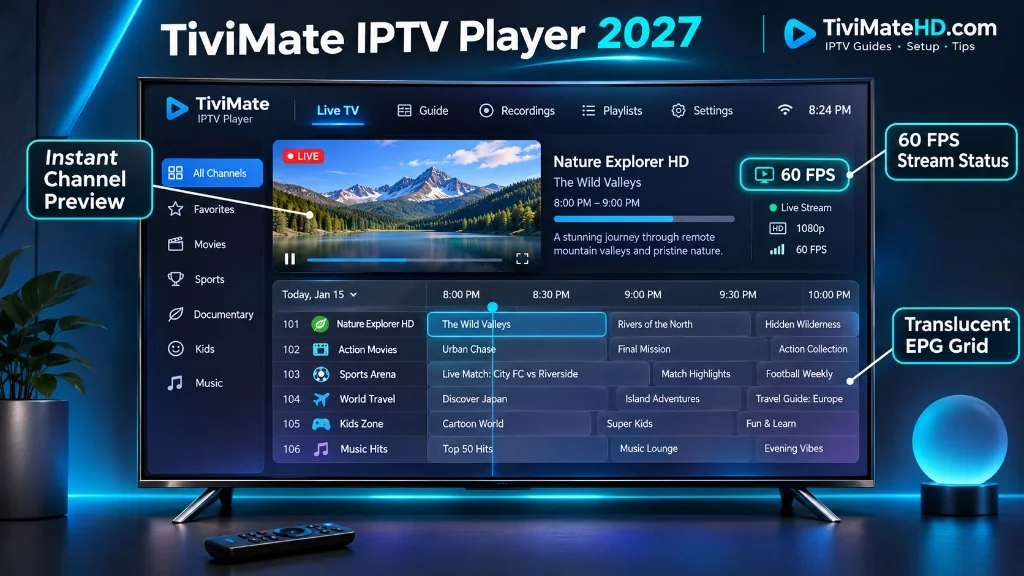
Why TiviMate IPTV Player 2027 Remains the Top Living-Room Interface
Many streaming apps treat television like a mobile phone grid, forcing remote-control users to tap through clunky nested menus just to switch between ESPN and a local CBS affiliate. TiviMate iptv player 2027 builds retain the muscle memory of traditional cable and satellite boxes while leveraging modern streaming hardware.
During channel surfing, TiviMate overlays a semi-transparent program guide directly over your active video stream so you never miss a play while scanning upcoming schedules. Custom group reordering lets households pin favorite USA locals, NFL Sunday Ticket channels, and news networks to the top of the guide while hiding thousands of unused international categories. Combined with full .tmb backup files, a carefully curated living-room setup transfers to every bedroom TV in sixty seconds.
For a detailed breakdown of core concepts and networking standards, explore our foundational guide on What Is IPTV & How Does It Work?.
TiviMate Free vs. TiviMate Premium: What Do You Actually Need in 2027?
TiviMate offers a free tier designed for basic single-playlist live TV testing, while TiviMate Premium (unlocked via Google Play or the TiviMate Companion app on Android, covering up to 5 devices per account) unlocks the complete cord-cutting feature set:
| Feature Category | TiviMate Free Tier | TiviMate Premium | Why It Matters in 2027 |
|---|---|---|---|
| Number of Playlists | 1 Playlist only | Unlimited Playlists | Combine primary and backup server lines seamlessly |
| Live TV EPG & Favorites | Live TV only (No Favorites) | Full Favorites & Group Management | Pin sports and local channels; hide unwanted categories |
| VOD Movies & Series Library | Restricted / Locked | Full 130,000+ VOD & Series UI | Browse movie posters, trailers, and season episodes |
| 7-Day Catch-Up & Replay | Not Supported | Full Catch-Up Timeline | Rewind missed broadcasts without manual recording |
| Multi-View Split Screen | Not Supported | Up to 4 Simultaneous Screens | Watch NFL RedZone, NBA, and F1 side by side |
| DVR Recording (USB / SMB) | Not Supported | Scheduled & Instant DVR | Record live games directly to a PC or NAS share |
| Parental Controls & Backup | Not Supported | PIN Locks + .tmb Backup/Restore | Clone entire household setups across 5 TVs instantly |
Step-by-Step: Clean Xtream Codes & 7-Day EPG Setup in TiviMate
Whether you are configuring a brand-new Nvidia Shield TV Pro, Google TV Streamer, or Fire TV Stick 4K Max, avoid pasting long raw M3U URLs whenever your provider gives you API credentials. Follow our streamlined process below:
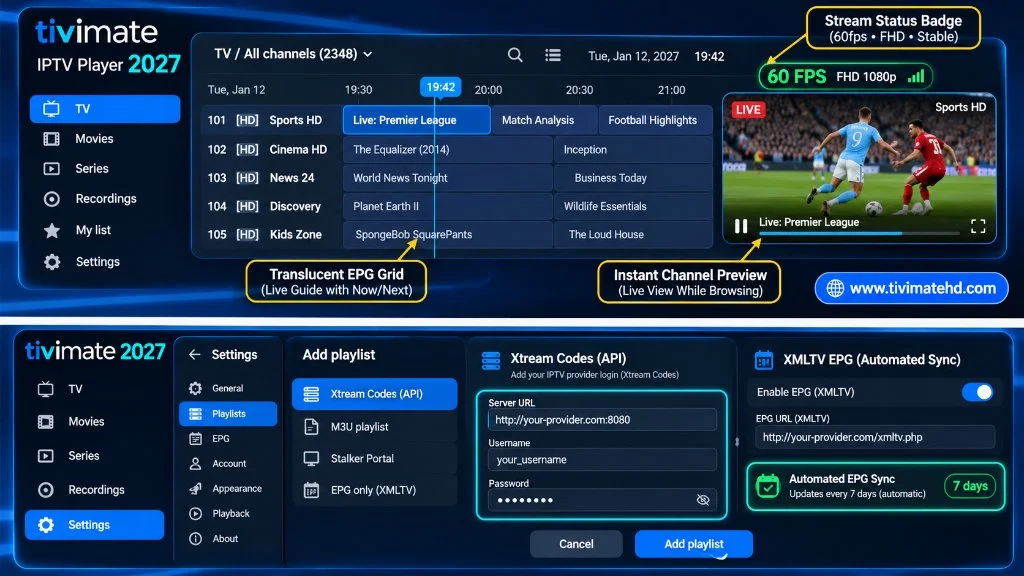
- Launch TiviMate and Add Playlist: Open TiviMate, select Add playlist, and click Xtream Codes.
-
Input Exact Server Details: Carefully enter the Server address (always include
http://orhttps://exactly as provided, with no trailing spaces), your Username, and your Password. Check the Include VOD box so movies and series populate alongside live channels. - Verify Playlist Processing: TiviMate connects to your provider’s API and reports exact counts for Live Channels, Movies, and TV Shows. Give the playlist a clean display name (for example, TiviMate HD 4K).
-
Configure EPG Auto-Refresh: Navigate to
Settings > EPG. Set Past days to keep EPG to 7 (for catch-up compatibility), turn Update on app start to ON, and set Update interval, hours to 12 or 24. - Clean Up Channel Groups: Long-press OK/Select on any unwanted category inside the guide, choose Group options > Manage groups, and toggle off languages or regions you never watch. Shorter active lists make guide scrolling instantaneous and reduce RAM usage on streaming sticks.
2027 4K HDR & 60fps Tuning: Exact Playback Settings That Stop Stutters
Out of the box, TiviMate uses conservative settings meant to avoid crashing weak budget TVs. Tuning four menus unlocks broadcast-smooth 4K HDR and 60fps sports motion on capable hardware:
1. Hardware Video Decoding & Audio Passthrough
Open Settings > Playback:
- Set Video decoder to Hardware. Software decoding forces your CPU to crunch 4K HEVC frames manually, causing dropped frames and thermal throttling.
- Leave Audio decoder on Hardware. If you connect your TV or Shield through an HDMI eARC soundbar or AV receiver, toggle Audio passthrough to ON so Dolby Digital Plus (EAC3) surround tracks pass untouched without downmixing.
2. Auto Frame Rate (AFR) for Sports Motion Clarity
North American sports networks broadcast at 59.94 fps, European football broadcasts at 50.00 fps, and cinema VOD streams at 23.976 fps. When a streaming box forces every feed through a locked 60 Hz HDMI output, 50fps soccer and 24fps movies suffer subtle cadence judder.
Navigate to Settings > Playback > Auto frame rate (AFR) and toggle Switch frame rate to ON.
3. Buffer Size Calibration
Under Settings > Playback > Buffer size, TiviMate defaults to None or Small:
- Ethernet / Wi-Fi 6E (< 5 ms jitter): Use Small for snappy 1-second channel switching with minimal lag behind live stadium action.
- Standard 5 GHz Wi-Fi: Use Normal to maintain a steady 2-to-3-second video cushion that absorbs brief household Wi-Fi dips.
4. Custom User-Agent Configuration
Some upstream CDN edge nodes inspect the HTTP User-Agent string sent by media players and rate-limit unrecognized headers. Under Settings > General > User-Agent, entering a clean standard identifier like IPTVSmartersPro or VLC/3.0.20 resolves occasional connection blocks, while TiviMate HD natively whitelists TiviMate’s default header.
Advanced 2027 Features: Multi-View, SMB DVR Recording & Backup
Once core playback runs cleanly, three Premium capabilities elevate TiviMate far beyond standard smart TV apps:
Multi-View Sports Mode
Press Down during any full-screen broadcast, select Multi-view, and add up to three additional feeds onto one split screen. You can swap audio focus between quadrants with a single remote click during NFL RedZone Sundays or Champions League fixtures. Running four screens simultaneously requires multi-connection support and hardware capable of parallel decoding (such as an Nvidia Shield TV Pro or Fire TV Cube).
SMB Network DVR Recording
Because most streaming sticks lack large internal drives, recording a three-hour live event locally fills storage rapidly. Instead, share a folder from your Windows PC, Mac, or home NAS over your local network using SMB (Server Message Block), point TiviMate’s Settings > Other > Recording path to that smb:// IP address, and schedule recordings seamlessly.
Instant .tmb Backup & Restore Across Devices
After organizing favorites, renaming channels, and hiding foreign categories, save your layout via Settings > General > Backup data. Transferring that single .tmb file to another TV via USB or SMB takes under sixty seconds, perfectly cloning your setup across every room.
Pairing TiviMate With Reliable 2027 Server Infrastructure
TiviMate is only as dependable as the video pipeline feeding it. Connecting a world-class player to an overcrowded budget reseller still produces frozen screens and missing EPG guides. TiviMate HD builds its North American and global 10 Gbps edge CDN specifically around TiviMate’s Xtream Codes API and XMLTV architecture:
- 25,000+ Live Channels & 130,000+ VOD Titles: Delivered in crisp 1080p60 and 4K HDR with automated logo and 7-day EPG mapping.
- Sub-Second Anti-Freeze Failover: Redundant hot backup feeds prevent blackouts during high-concurrency PPV fights and championship games.
- Transparent One-Time Passes: Instant digital delivery via WhatsApp and email with zero recurring billing traps.
Supercharge Your TiviMate Player Today
Choose a high-speed access pass with instant WhatsApp activation:
Frequently Asked Questions
Does TiviMate IPTV Player include live TV channels or movies?
No. TiviMate IPTV Player is a standalone media player built by Armobsoft FZE and contains zero pre-loaded channels or movies. You must enter your own Xtream Codes API or M3U credentials from a dedicated streaming service like TiviMate HD.
Can I run TiviMate IPTV Player on Apple TV, Roku, or Samsung Smart TV?
No. TiviMate is built strictly for Android TV, Google TV, and Amazon Fire OS devices such as Nvidia Shield TV Pro, Fire TV Stick 4K Max, and Google TV Streamer. Apple TV 4K viewers should use UHF or TiviMax, while Samsung and LG Smart TVs run IBO Player or IPTV Smarters natively.
Is Xtream Codes API better than an M3U URL inside TiviMate?
Yes. Connecting through Xtream Codes API keeps live channels, VOD movies, series episodes, and EPG schedules cleanly separated, synchronizes much faster on low-power sticks, and enables 7-day catch-up automatically.
How many simultaneous screens work in TiviMate Multi-View?
TiviMate Premium supports up to four live channels simultaneously in Multi-View depending on your device’s video decoder limits. Keep in mind that each active screen consumes one simultaneous server connection from your IPTV subscription.
How do I move my TiviMate favorites and layout to another TV?
Open Settings > General > Backup data to export a .tmb configuration file to local storage or a shared SMB network folder. Install TiviMate on your second TV and import that exact file via Restore data.