
Written by David Miller, Senior Streaming Systems Architect | TiviMate HD Tech Lab
Topic: Xtream Codes RESTful API Architecture, Credential Optimization & TiviMate Integration
✔ Verified & Tested on TiviMate IPTV Player v5.1.0
When adding a playlist to TiviMate IPTV Player, you are presented with two primary connection options: M3U Playlist or Xtream Codes API.
While both methods connect to your video provider, experienced cord-cutters universally recommend Xtream Codes for TiviMate. Instead of forcing your streaming device to download a massive, static plain-text file every time you launch the app, the Xtream Codes API establishes a dynamic RESTful connection. It automatically organizes channels into structured categories, downloads updated Electronic Program Guide (EPG) schedules in seconds, and provides native access to catch-up TV and Video on Demand (VOD) movie libraries.
However, entering API parameters incorrectly is the leading cause of login failures. In this 2026 walkthrough, we break down the exact URL formatting requirements, explain each configuration field inside TiviMate, and show you how to connect with TiviMate HD in under two minutes.
Why Xtream Codes API Is Superior to M3U in TiviMate
Understanding the technical differences explains why the Xtream Codes API is the preferred industry standard for television streaming apps:
| Feature | Raw M3U Playlist URL | Xtream Codes API |
|---|---|---|
| Playlist Loading Speed | 30 to 60 seconds (Slow download) | 3 to 8 seconds (Instant JSON handshake) |
| EPG Guide Setup | Requires typing a separate XMLTV URL | Automated (Embedded in API response) |
| VOD Movie & Series Catalog | Clutters live TV guide with raw links | Organized into separate VOD sections |
| 7-Day Catch-Up TV | Often requires complex regex tags | Pre-linked into EPG timeline |
| Channel Categorization | Dependent on static file tags | Dynamically updated by provider server |
Step-by-Step: Adding Xtream Codes API to TiviMate
Follow these exact steps to connect your IPTV line with maximum stream stability:
Step 1: Open the Add Playlist Menu
- Launch TiviMate on your Amazon FireStick or Android TV device.
- If this is a fresh installation, click Add Playlist. If you already have an existing playlist, go to
Settings > Playlists > Add playlist. - Choose Xtream Codes API from the playlist setup menu.
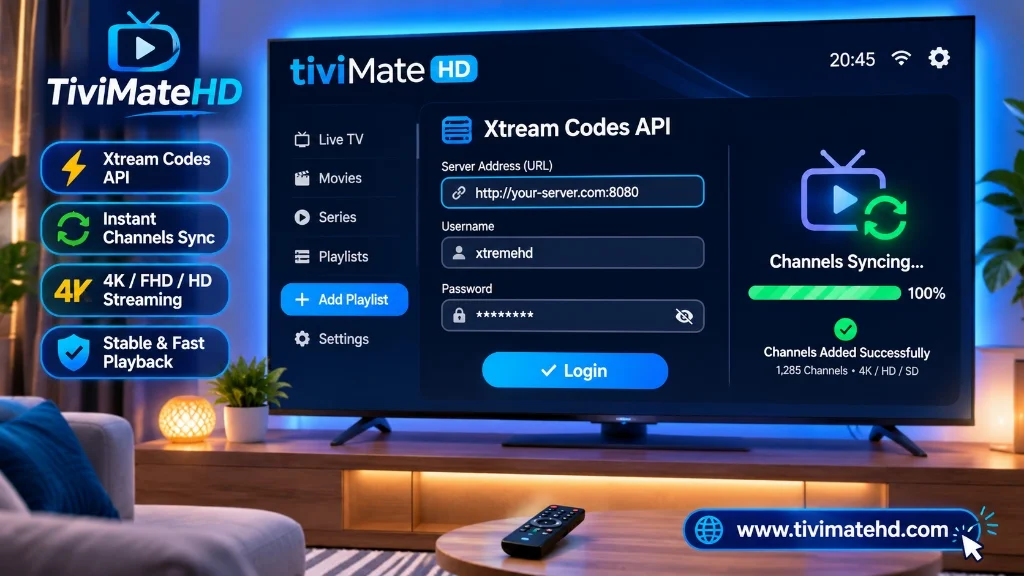
Step 2: Input Your Server URL & Credentials
You will see three primary input fields:
-
Server Address: Enter your provider’s server domain and port number.
http://line.tivimatehd.com:8080
Important Rule: Do not add a trailing slash (/) at the end of the URL, and ensure you use http:// rather than https:// unless your provider explicitly mandates SSL encryption. - Username: Enter your assigned subscription username.
- Password: Passwords are case-sensitive. Verify uppercase and lowercase characters carefully.
Step 3: Enable VOD & Finish Configuration
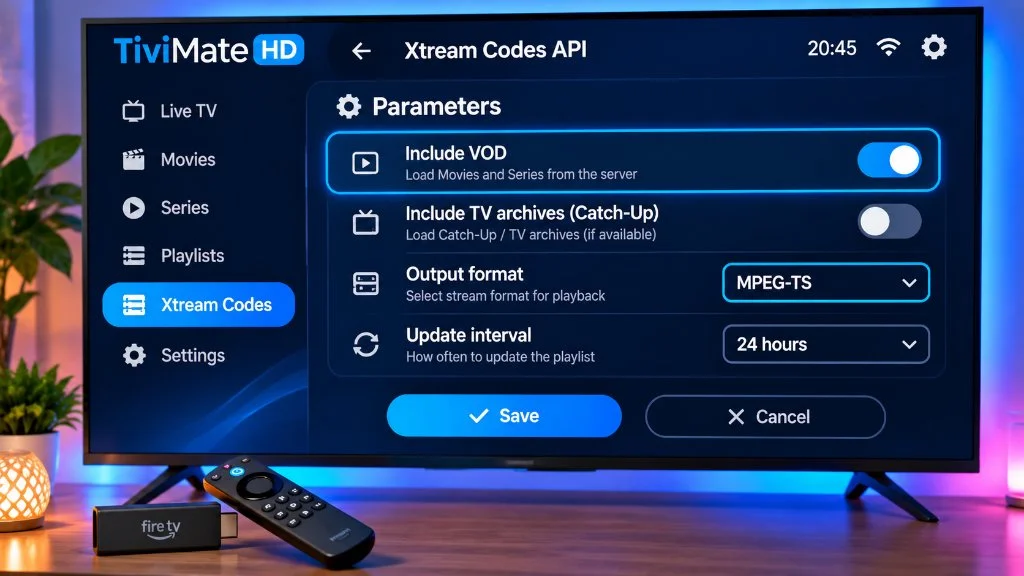
- Check the box that says Include VOD (Video on Demand) if you want full access to movies and complete television series.
- Click Next.
- Enter a friendly name for your playlist (e.g., “TiviMate HD USA”).
- Click Done.
TiviMate will now execute a three-stage handshake: parsing live channel categories, organizing VOD libraries, and downloading Electronic Program Guide (EPG) schedules.
Common Xtream Codes Errors & Quick Fixes
Error: “Failed to get data from server”
Check your Server Address for accidental trailing slashes or spaces. If your URL is http://line.tivimatehd.com:8080/, delete the final slash. Also ensure you did not accidentally type an extra space when copy-pasting your credentials.
Error: “Account expired or invalid”
Verify that your username and password match your exact order confirmation. Passwords are strictly case-sensitive. If errors persist, confirm with your provider that your account line is active.
Channel Freezing on 4K Sports Streams
Navigate to Settings > Playlists > [Your Playlist] > Xtream Codes parameters > Output format and toggle from HLS to MPEG-TS. MPEG-TS provides raw container parsing which reduces hardware decoding bottlenecks on Amazon FireStick and Android TV devices.
Experience Flawless Xtream Codes Streaming with TiviMate HD
TiviMate HD delivers dedicated Xtream Codes API infrastructure specifically optimized for the TiviMate player ecosystem:
- Instant Automated Delivery: Clean, typo-free API login credentials sent instantly via WhatsApp and email.
- Over 25,000 Live Channels: Broadcast in crystal-clear 4K UHD and authentic 60 FPS sports with zero motion blur.
- Dedicated US CDN Infrastructure: Anti-freeze edge caching nodes across 5 Tier-4 data centers eliminate peak-hour lag.
- Auto-Synchronizing EPG: Pre-mapped XMLTV data feeds refreshed every 24 hours to eliminate “No Information” errors.
Get Your High-Speed Xtream Codes Login Today
Choose a transparent, one-time access pass with instant WhatsApp activation:
Frequently Asked Questions
What is the correct Xtream Codes server URL format for TiviMate?
The correct format is http://domain.com:port without a trailing slash at the end (e.g., http://line.tivimatehd.com:8080). Adding a trailing slash or typing https instead of http when the server does not support SSL is the most common cause of connection failures.
How do I fix the “Failed to get data from server” error in TiviMate?
First, ensure there are no trailing slashes or spaces in your Server URL. Second, verify your username and password case sensitivity. Third, if your ISP is throttling IPTV traffic, test with a VPN or toggle your output stream format from HLS to MPEG-TS in playlist parameters.
Why is Xtream Codes API better than an M3U playlist in TiviMate?
Xtream Codes creates a lightweight RESTful connection that downloads in 3 to 8 seconds compared to 30 to 60 seconds for large M3U files. It also dynamically syncs EPG TV guide data, separates VOD movies from live channels, and supports catch-up TV automatically.
Where do I get reliable Xtream Codes credentials for TiviMate?
TiviMate HD provides instant automated Xtream Codes credentials upon subscription, featuring 25,000+ 4K and 60 FPS live channels, dedicated US Tier-4 CDN servers, and 24/7 WhatsApp setup support.